Reading a Career Trajectory Timeline
Instead of a single-year snapshot, CompensationAtlas shows an employee's entire recorded career as one connected timeline — every title, transfer, and raise in sequence.
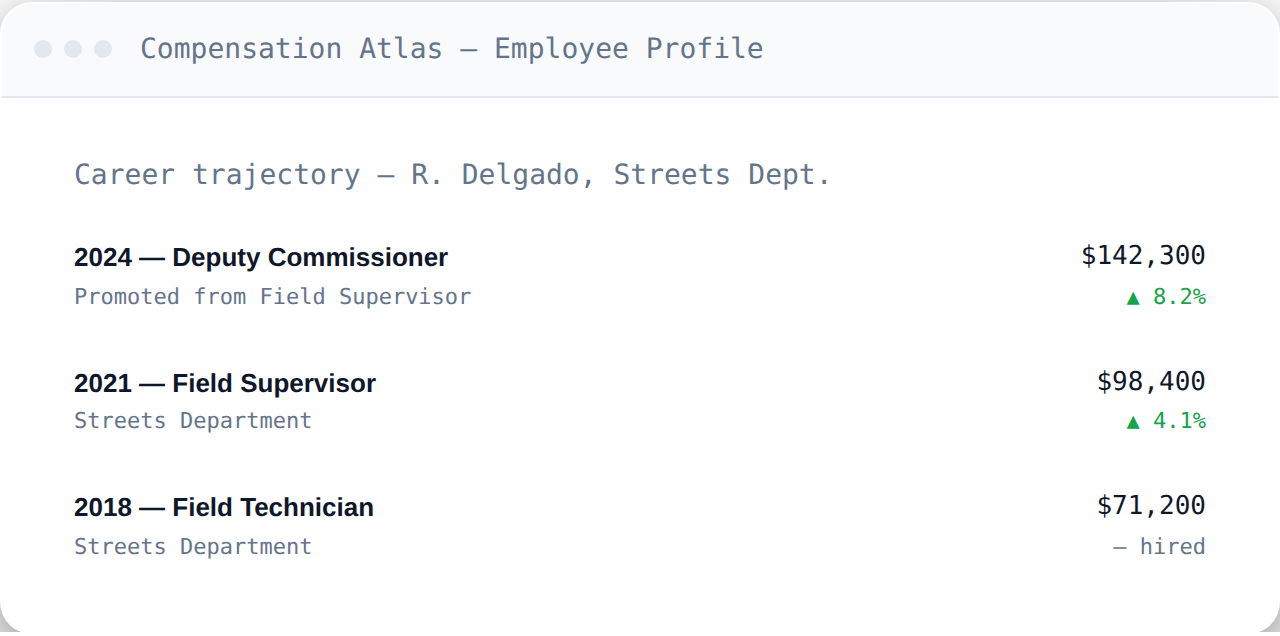
What each row shows
Each row in the timeline represents one recorded position: the year it started, the title held, the department, and the pay associated with it. Where a change happened — a promotion, a transfer, or a new hire — that context is noted directly (for example, "Promoted from Field Supervisor" or "— hired").
Reading the change indicators
Next to each pay figure, an up or down indicator shows the change from the prior recorded position, so you can see at a glance whether a move came with a raise and roughly how large it was, without having to do the subtraction yourself.
Why it's ordered this way
Most payroll tools show a single year at a time, which makes it easy to miss the bigger pattern — how someone's pay actually evolved across promotions and transfers. Reading top to bottom (most recent first) surfaces that pattern immediately: how fast someone rose, whether a transfer came with a pay cut or a raise, and how their current pay compares to where they started.
Comparing against peers
A trajectory on its own tells you one person's story. To see how it stacks up against others in the same role or department, use the department rollup view, which aggregates trajectories across everyone in a given department.
Frequently asked questions
Does the timeline include overtime?
The trajectory view focuses on the base pay rate per position. For the overtime-vs-rate distinction, see Rate vs. Actual Earnings.
How far back can a trajectory go?
As far back as 2016, which is where the underlying OpenDataPhilly archive begins.
Can I export a trajectory?
Yes, on the Single Tool Plus tier and above — see Exporting Data to CSV.